

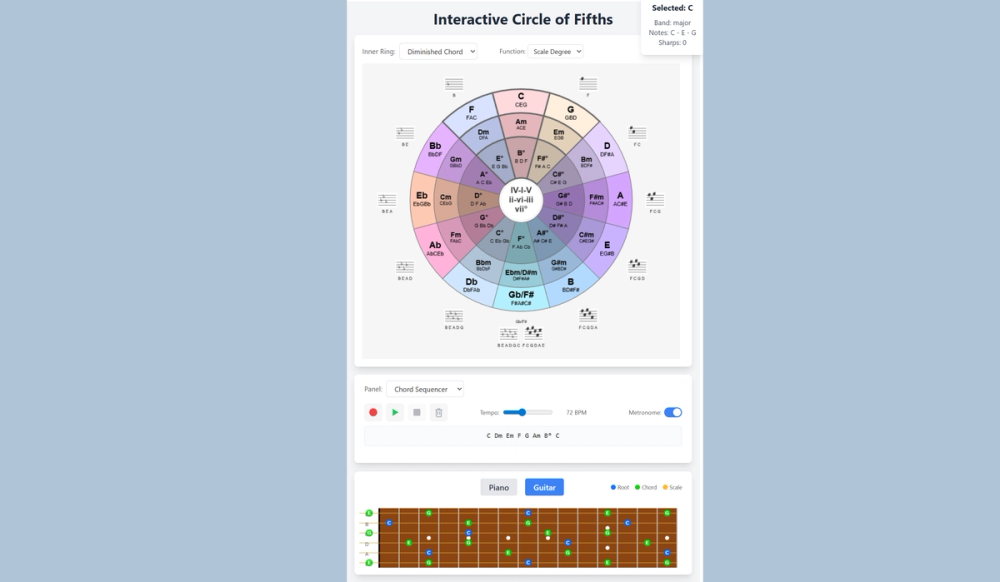
If you’ve ever wondered why certain chords sound good together, why some key changes feel smooth while others feel jarring, or how musicians seem to instinctively know which notes will work over a chord progression, the Circle of Fifths holds many answers. It's a visual map of all 12 major and minor keys, arranged to reveal the relationships between them. It’s been a cornerstone of Western music theory for nearly 300 years.
Keys are arranged in a circle, starting with C and incrementing a perfect fifth for each clockwise step. Moving the other directions decrements the key by a perfect fourth. Select a key to hear the Major chord associated with it. The circle will highlight a wedge that includes the I, IV and V chords for that key, so in the case of C the wedge consists of F, C, G. Moving towards the center of the circle, the middle ring for that wedge contains the associated Minor chords, the ii, iii and vi. In the key of C this includes Dm, Em and Am.
As you select chords, samples will play using either a piano or guitar, and visualizers will show all the notes in the chords so you can reinforce your mental image and practice fingerings. You can also play single notes using both visualizers, useful for hearing how specific notes sound against chords.
The Inner Ring of the circle is configurable. By default it includes the Diminished chords of the selected key, the vii. In the case of C this would be Bdim. Overrides render scales instead, including pentatonic, blues, and diatonic scales. When they're selected the scale is played ascending and descending.
The Middle Panel of the page is also configurable. By defaul it renders the harmonized scale for the selected Major or Minor chord, a useful practice asset. Select the Chord Sequencer to display an interactive sequence. Record simple progressions with the built-in metronome, then loop them with the Play button for interactive practice sessions that activate the keyboard and fretboard visualizers as they are played.
The interactive nature of this tool is unique. The visualziers make it stand out in the crowd, and configurable options for the Inner Ring and Middle Panel set it apart from other pages that simply render the circle and play sounds. Overall, a useful tool for musicians, students of music theory, and composers. Site metrics show users linger on the page for 15-45 minutes, and personal annecdotes cofirm it's fun and satisfying to use.
The Interactive Circle of FIfths. What will you compose today?


